


Two Ways Into This Conversation
Your finance team thinks your legacy system costs exactly what the annual maintenance contract says it costs.
It doesn’t.
The true cost of maintaining legacy systems is rarely found on a single vendor invoice. It quietly bleeds your budget from places nobody thinks to look: contractor retainers, compliance exposure, internal IT distractions, and productivity drag that compounds every year the system stays on life support.
A 2024 SnapLogic survey of 750 IT decision-makers found that legacy tech cost the average business $2.9 million in 2023. Nearly two-thirds of businesses invest more than $2 million annually on maintaining and upgrading legacy systems alone. For individual organizations, it is shockingly common to discover that a single aging application is quietly consuming six figures a year once every cost is accounted for.
Most organizations don’t uncover these numbers until they are already deep into a decommissioning project and forced to calculate the math backward.
This article does that math up front. We break down where the hidden costs actually live, why the invoice is never the whole story, and what a cleaner path forward looks like.
The Number on the Invoice Is Not the Number
Here’s what a typical legacy system maintenance invoice covers:
- Annual software licensing fees
- Vendor support contract (if the vendor still offers one)
- Hosting or server costs
Here’s what it doesn’t cover:
- The contractor kept on retainer because they wrote the original integration
- The internal IT hours spent keeping the environment stable
- The security patching that can’t happen because the vendor stopped issuing updates
- The compliance exposure from running an unsupported system in a regulated environment
- The productivity cost to every person who needs data from that system and has to work around its limitations
- The organizational attention diverted from higher-value projects to keep something running that nobody actually wants anymore
The gap between those two lists is where the $200K lives. Sometimes it’s more.
How to Actually Count What a Legacy System Costs
Direct Costs: What Shows Up in a Budget Line
Start here, because this is the part most organizations have already documented. Add up:
Licensing and vendor support: Even systems approaching end-of-life often carry annual licensing costs. If your vendor is still offering extended support (sometimes called paid EOL support), those costs frequently run higher than standard contracts because the vendor knows you’re stuck. It’s not unusual for extended support agreements to cost 20–30% more than standard licensing.
Infrastructure and hosting: On-premise systems require servers, power, cooling, and physical space. Cloud-hosted legacy applications still carry compute and storage costs. If the system was stood up five years ago and the underlying infrastructure was sized for that workload, it may be overprovisioned today. You’re paying for capacity you don’t use.
Internal IT labor: This is the number most organizations undercount. Legacy systems require someone to keep them running. Patches get applied (or can’t be), backups get managed, access requests get processed, and occasional breaks get fixed. Even a low-maintenance legacy system that “runs itself” typically consumes 10–20 hours per month of IT staff time. At a fully-loaded internal labor rate, that’s real money, and it’s labor that isn’t being spent on anything strategic.
The Contractor Problem: What You’re Paying for Institutional Memory
This is where the costs start to get uncomfortable.
Many legacy systems were built or customized by contractors or developers who have since moved on. The documentation, if it exists, is incomplete. The business logic embedded in the system exists in one place: the head of the one person who still understands how it works.
Organizations in this position typically respond by keeping that person on retainer. Not because they need them full-time. Because they’re afraid of what happens if something breaks and nobody can fix it.
A realistic scenario: A mortgage servicing organization running a 12-year-old reporting tool keeps a part-time contractor on a 20-hour-per-month retainer at $150/hour. That’s $36,000 per year to maintain access to institutional knowledge, not to improve or expand the system, and not because anything is actively broken. Just because the alternative is worse.
Multiply that across two or three legacy systems, and you’re looking at a significant line item for expertise that exists nowhere in your organization.
The Compliance Exposure Cost: The One Nobody Puts on a Spreadsheet
This cost is real, even though it’s harder to quantify before something goes wrong.
Running a legacy system in a regulated environment creates compliance exposure in two specific ways:
- Unsupported systems create audit risk. When a vendor stops issuing security patches, any vulnerability that emerges afterward stays open indefinitely. For organizations subject to regulatory examination, including CFPB oversight, HIPAA requirements, or federal information security mandates, running knowingly unsupported systems is not a neutral position. Examiners ask about it. Some regulations require it to be disclosed.
- Records access uncertainty creates legal risk. If the system holds historical records and nobody has formally answered “what happens to those records when this system goes dark,” you have a pending problem. Regulatory audit document retrieval requirements don’t pause because your vendor stopped supporting your platform. The obligation to produce records on demand remains, regardless of what happens to the system that originally generated them.
The conservative cost to put on this line: the projected cost of a compliance event, multiplied by the probability you assign to it. For organizations in active regulatory environments, that number is not zero, and it grows every year the system stays on life support.
The Productivity Tax: What It Costs When the System Is Slow, Limited, or Just Painful
Legacy systems cost money every time someone has to use them (and not just to maintain them).
Consider what happens when a mortgage servicing operations team needs a report from a system that:
- Requires a specific desktop client to access
- Takes 45 minutes to generate a report that should take 5
- Can only be accessed by two people who know the login credentials
- Requires a phone call to IT when the VPN connection breaks (which it does, regularly)
That’s not a hypothetical. That’s a description OCIE hears regularly from clients who’ve been living with a legacy system for years and have normalized the friction so thoroughly they’ve stopped seeing it as a cost.
The math: If five people spend 30 minutes per week working around a legacy system’s limitations, that’s 2.5 hours per week in productivity loss. At an average fully-loaded salary of $75,000 per year for operations staff, that’s roughly $4,500 per year in time lost to one friction point. Across a larger team with multiple friction points, this adds up faster than most organizations expect.
The Opportunity Cost: What Isn’t Getting Done Because This System Exists
This is the least visible cost, but it’s often the most significant.
Every hour your IT team spends managing a legacy system is an hour not spent on the platform initiatives, integration projects, or security improvements on your roadmap. Every month a modernization project stalls because “we have to figure out the legacy data piece first” is a month of delayed value.
Legacy system data preservation problems are one of the most common reasons modernization projects miss their timelines. Organizations plan the new platform implementation down to the sprint. They forget to plan for what happens to the old one. When the question finally surfaces, the project stops while people figure it out.
The opportunity cost is the credibility hit to the modernization program, the extended contract terms that get triggered, and the internal frustration that builds when a project that was supposed to be finished two quarters ago is still open.
Building the Full Picture: A Sample Cost Stack
Here’s what a realistic annual cost breakdown looks like for a mid-market legacy system that nobody uses but nobody has retired:
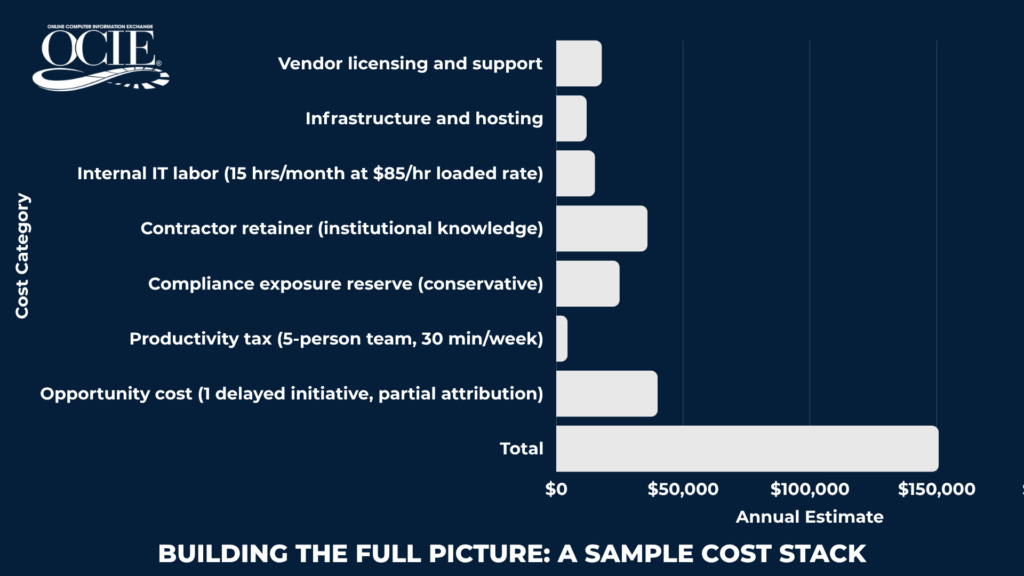
Add a second contractor, a larger operations team, or a more active regulatory environment, and that number clears $200,000 without difficulty.
The $200K figure isn’t a fabrication or a worst-case scare tactic. It’s what happens when you count everything instead of just the invoice.
What Makes This Hard to See
Organizations don’t deliberately undercount legacy costs. The costs are just genuinely distributed across different owners.
- Licensing sits with IT finance
- Contractor retainers sit with procurement or vendor management
- Staff time sits with operations and HR
- Compliance exposure isn’t a current-period expense at all until something goes wrong
- Productivity drag lives in individual calendars and nobody aggregates it
No one person in the organization sees the full number. Which means no one person has ever made the case for retirement based on the full number.
That’s the gap this kind of cost analysis is designed to close.

The Comparison That Changes the Conversation
Here’s what the conversation looks like once the full cost is on the table:
Option A: Keep the system running. Estimated ongoing cost: $150,000–$200,000 per year. Compliance exposure growing. Contractor dependency unchanged. IT attention tied up. No end date.
Option B: Retire the system with a managed legacy archive. One-time project cost to capture, index, and archive all historical outputs. Ongoing flat-rate managed service for access and retrieval. No IT involvement required after implementation. Records remain tamper-proof, permanent, and instantly retrievable. Full compliance with regulatory retention requirements.
The math on Option B often looks better in year two than year one. By year three, it’s not a close comparison.
The question to ask your leadership team: “If we could eliminate $150,000 in annual carrying costs, remove our compliance exposure on this platform, and give every person in the organization instant access to historical records with no IT overhead, what would we need to see to approve it?”
That question reframes the conversation from “can we afford to retire this system” to “can we afford not to.”
What Happens Next
If this cost analysis sounds like your organization, the next step is a conversation about what your legacy system actually produces, what you’d need to access from it going forward, and what your retention requirements actually are.
Those three questions take about 30 minutes to work through. The answers determine whether application retirement archival is the right path, and what a project scoped to your specific situation would look like.
The organizations that make this transition cleanly are the ones that start with the right questions, not the right vendor. Figure out your numbers first. Everything else follows from there.
OCIE has helped regulated organizations in mortgage servicing, federal government, and financial services retire legacy systems without data migration for over 30 years. If you want to work through the cost analysis for your specific situation, our team can help you build the numbers before you build the case. Schedule a demo call with our team today.