Two Ways to Think About This Article
The data-driven case: In 2019, the U.S. federal government spent 80% of its IT budget on operations and maintenance of existing systems, leaving only 20% for development, modernization, and enhancement. Meanwhile, an NTT DATA Lifecycle Management Report found that 80% of organizations agree that inadequate or outdated technology is holding back innovation, and 94% of C-suite executives believe legacy infrastructure is greatly hindering business agility.
The organizations caught in that gap aren’t failing because they lack strategy. They’re often failing because the people trying to move a retirement project forward can’t agree on what “decommissioning” actually means.
The contrarian case: Most glossaries about application retirement are written for IT architects. They assume you know what a spool file is, why a mainframe output matters, or what separates “sunsetting” from “decommissioning” in practice. You shouldn’t need a computer science degree to understand what’s happening to your organization’s data. The language around legacy system retirement has been needlessly technical for too long, and that complexity is costing real money.
This glossary exists to fix that. Whether you’re an IT director holding a vendor end-of-life notice, a compliance officer worried about records access after a system goes dark, or an operations leader trying to build a business case, these are the terms you need to know and what they actually mean in practice.
Why Legacy Decommissioning Language Matters
Confusion around terminology creates real risk.
When a compliance officer hears “data migration” and an IT director means “application retirement,” projects go off the rails. When a prime contractor talks about “legacy modernization” and the client expects their data to land in a new platform, budgets blow up. When a legal team hears “system shutdown” and nobody has clarified what happens to the records inside, audit exposure follows.
The terms below are the ones that come up most often in legacy system decommissioning conversations. Some overlap. Some are used interchangeably when they shouldn’t be. All of them are worth understanding before your organization commits to an approach.
The Core Legacy Decommissioning Terms
Legacy System
What it means: Any application, platform, or software environment that is no longer under active development or vendor support, but is still being used to run business operations or store historical records.
What it looks like in practice:
- A mortgage servicing organization running MSP (the ICE/Black Knight platform) that also maintains a 15-year-old in-house reporting tool no one knows how to turn off.
- A federal agency still running a travel management system that hasn’t had a patch in four years.
- A healthcare organization with a patient record archive sitting on a server in a back room because nobody’s been authorized to move it.
Why it matters: Legacy systems fail slowly, through accumulated risk: rising maintenance costs, shrinking vendor support, growing security exposure, and increasing difficulty extracting the data inside. The longer a system lives past its useful life, the harder and more expensive the eventual retirement becomes.
Application Retirement
What it means: The planned, controlled process of formally ending an application’s operational life, including preserving access to the historical data or records it contained.
What it’s often confused with: Deletion, or “just turning it off.” Application retirement is not the same as destroying data. Done correctly, it ends the system while preserving everything inside it in a form that remains accessible, searchable, and compliant.
The critical distinction: Retiring an application is a business decision with compliance implications. It requires answering: what historical data does this system hold, who needs access to it, for how long, and under what regulatory requirements? The answers to those questions determine what retirement actually looks like.
Application Decommissioning
What it means: Often used interchangeably with application retirement, but technically refers to the full technical process of removing an application from active infrastructure, including shutting down servers, canceling licenses, and eliminating ongoing costs.
The nuance: You can decommission a system without properly retiring it, meaning you can shut everything down without adequately preserving the information inside. That’s where organizations run into compliance and legal trouble.
In regulated industries: Application decommissioning without a sound information archival plan is not a complete project. It’s a liability. Legacy data archival is the piece that makes decommissioning defensible.
Sunsetting
What it means: The gradual wind-down of a system, product, or service. Sunsetting is typically a transition period, not a single event. A vendor might announce that a product will be “sunsetted” by a certain date, meaning support, updates, and new development will cease.
What triggers it:
- Vendor end-of-life announcements
- Organizational platform migrations (such as MSP onboarding or ICE transitions)
- Mergers and acquisitions that consolidate platforms
- Modernization mandates from agency leadership or regulatory bodies
What people miss: Sunsetting a system is the decision. Decommissioning is the execution. They require different teams, different timelines, and different plans. Organizations that confuse the two often sunset a system on paper while it continues running in practice because nobody planned for what happens to the data.
Legacy System Modernization
What it means: The broader organizational or program-level initiative to replace aging systems with current-generation technology. Modernization can mean migrating to cloud platforms, replacing on-premise infrastructure, or re-architecting how business processes are supported.
Where it intersects with decommissioning: Most modernization projects create decommissioning requirements. When you move to a new platform, the old one has to go somewhere. Modernization projects that don’t plan for legacy data preservation frequently stall at the finish line because the old system can’t go dark until records are accounted for.
A note for federal and defense contractors: “Legacy modernization” carries specific meaning in government contracting contexts. Agencies operating under OMB mandates or modernization directives face formal requirements to address legacy infrastructure, often with compliance deadlines attached. Government contractor information management is a distinct specialty, and the regulatory language differs from private-sector contexts.
Data Migration
What it means: The process of moving data from one system to another, including transforming it to match the target system’s structure or data model.
Why it’s not the same as decommissioning: This is one of the most consequential distinctions in the field. Data migration is a reconstruction project. It requires understanding the old system’s schema, mapping fields to the new system, running validation processes, and confirming that nothing was lost or corrupted in transit.
The problem: For many legacy systems, full data migration is impractical or impossible. The business logic baked into old mainframe reports, for example, often can’t be reverse-engineered cleanly. The schema documentation may not exist. The internal subject matter expert may have retired. And the cost in both time and money is almost always higher than projected.
The alternative: Information-level archiving, described below, captures what the legacy system already produced rather than trying to reconstruct it from the database up. This is not the same as data migration, and for most regulated organizations facing legacy system decommissioning, it’s the lower-risk approach.
Information Archival
What it means: The process of capturing, indexing, and preserving the outputs a system has already generated, so they remain accessible, searchable, and compliant after the system goes dark.
How it differs from data migration: Data migration works at the database level. Information archival works at the output level. Instead of extracting raw data and rebuilding business logic in a new environment, information archival captures reports, statements, and documents in the finished form they already exist in, including all the formatting, calculations, and business rules already applied.
Why it matters for regulated industries: Regulators don’t typically ask for raw database exports. They ask for records. What did this borrower’s statement say on this date? What did this report show at month-end? Information archival preserves exactly that, in the form an examiner or auditor would recognize.
The compliance advantage: A properly built information archive is tamper-proof and permanent. Records can’t be deleted, altered, or moved. That’s not a feature add-on. For organizations subject to CFPB examination, investor audit, or federal retention requirements, it’s the baseline requirement.
Legacy Data Preservation
What it means: The active, ongoing protection of historical information from a retired or retiring system. This includes ensuring records remain accessible over time, that they’re stored in a format that won’t degrade or become unreadable, and that they meet retention requirements.
The long-term problem most plans miss: File formats change. Storage media ages. Platforms evolve. An archive built today needs to be readable and searchable in ten years, because your retention requirements don’t expire when the original system does. Legacy data preservation accounts for that continuity.
Managed Archive Service
What it means: A third-party managed service that takes on ongoing responsibility for hosting, maintaining, and supporting an organization’s historical record archive, rather than requiring the organization to run and maintain its own infrastructure.
Why it matters: Most organizations retiring a legacy system aren’t looking to build a new system in its place. They want the historical data accessible without the ongoing burden of managing another environment. A managed archive service, particularly a flat-rate document archive service, removes that overhead entirely.
What to look for:
- No IT involvement required from your team
- Permanent, immutable records that can’t be altered after ingestion
- Fast retrieval: seconds, not hours or days
- Compliance-grade security, including encryption, access controls, and audit trails
- Zero IT overhead document archive capability, meaning the vendor handles everything
End-of-Life (EOL)
What it means: A vendor-issued designation indicating that a product will no longer receive updates, patches, security fixes, or support after a specific date.
What it triggers: EOL is one of the most common forcing functions for legacy system decommissioning. When a vendor stops supporting a system, the organization running it takes on the full risk of any security vulnerabilities, compliance failures, or operational breakdowns that follow.
The risk organizations underestimate: Running an unsupported system in a regulated environment isn’t just a technical problem. It’s a compliance problem. Regulators in mortgage servicing, healthcare, and federal contracting take a dim view of organizations that can document they knew a system was unsupported and chose to keep running it anyway.
Regulatory Retention Requirements
What it means: Legally mandated timeframes specifying how long certain records must be retained, in what form, and with what level of accessibility and integrity.
Why they govern decommissioning decisions: You can’t retire a system until you know how long its records need to be kept. Retention requirements vary by industry, record type, and applicable regulation, including HIPAA, CFPB mortgage servicing requirements, and federal records archive mandates. A system that looks like it could go dark tomorrow may be holding records with a 10-year retention requirement.
The tamper-proof requirement: Many regulatory frameworks don’t just require that records be retained. They require that records be unalterable, meaning no one can edit, delete, or modify a record after it’s been created. That’s the technical standard a tamper-proof document retention system is designed to meet.
The Terms That Get Confused Most Often
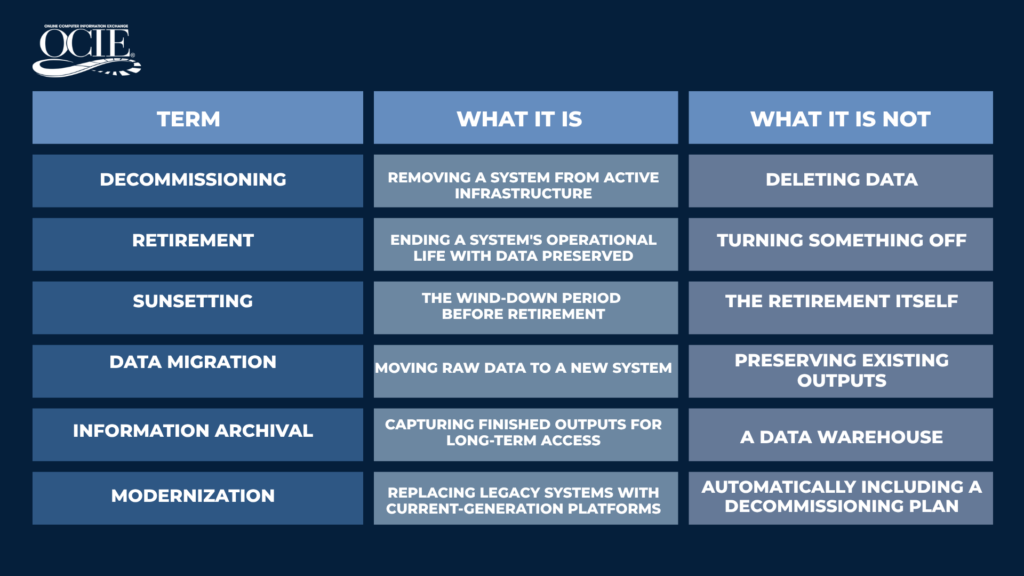
What This Means for Your Organization
If you’re reading this glossary, you’re probably already staring at a system that needs to retire. Maybe it’s an MSP implementation forcing a reporting change. Maybe a vendor EOL notice arrived. Maybe a merger left you with three platforms where there should be one.
The terminology matters because the path forward depends on what problem you’re actually solving. Legacy system decommissioning is not a data migration project. It’s not a document management implementation. It’s not a simple shutdown.
It’s a records preservation project, and the organizations that get it right are the ones that start by asking the right questions: What does this system produce? Who needs access to that information? For how long? Under what compliance requirements?
If those questions are still unanswered for your organization, that’s where to start.
__________________________________________________________________________
OCIE has helped regulated organizations in mortgage servicing, federal government, and financial services retire legacy systems safely for over 30 years. If you’re working through a legacy retirement and want to talk through your options, we’re easy to reach.